Connect ChatGPT to the Uiprobe MCP server to compare a Figma frame with a live webpage from a chat. ChatGPT runs the probe, waits for the result and reads the findings back to you.
Once Uiprobe is connected, you can ask ChatGPT to:
ChatGPT changes its menus and settings regularly. These steps were checked in October 2026, so a label or menu may look slightly different for you. If you can't find a step, contact support@uiprobe.io and we'll help you connect.
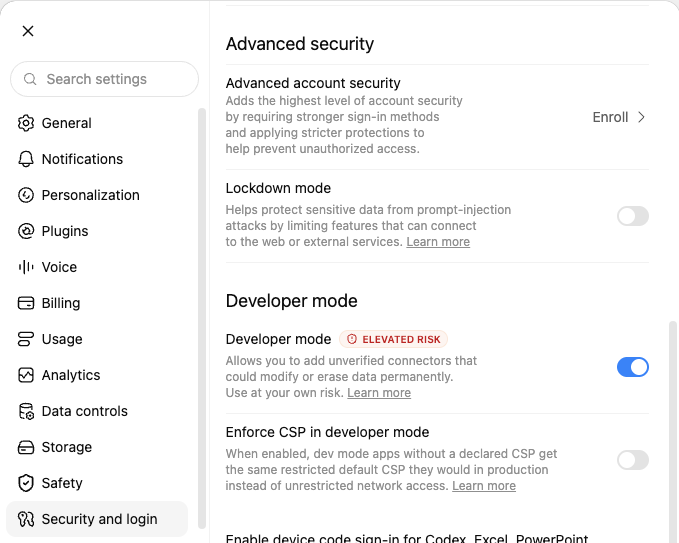
If you don't see the option in a ChatGPT Business or Enterprise workspace, your workspace admin has to allow it first.
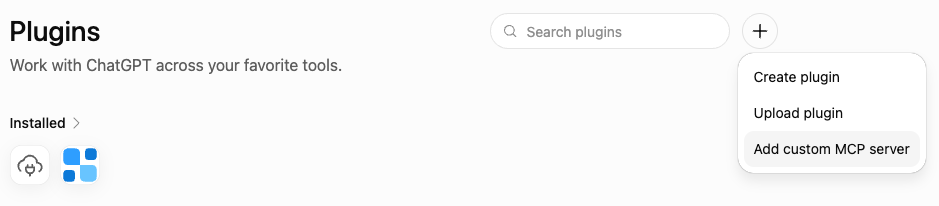
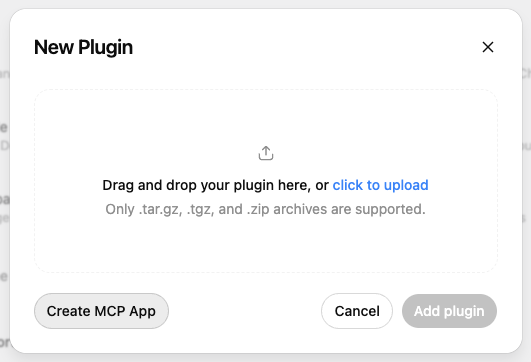
https://app.uiprobe.io/mcp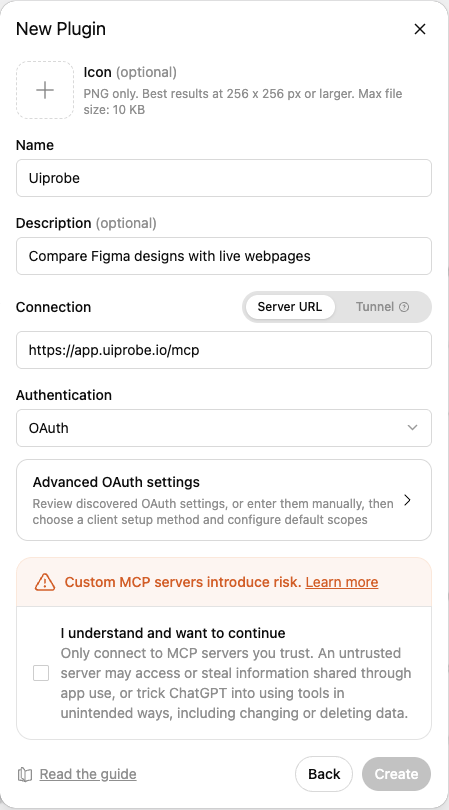
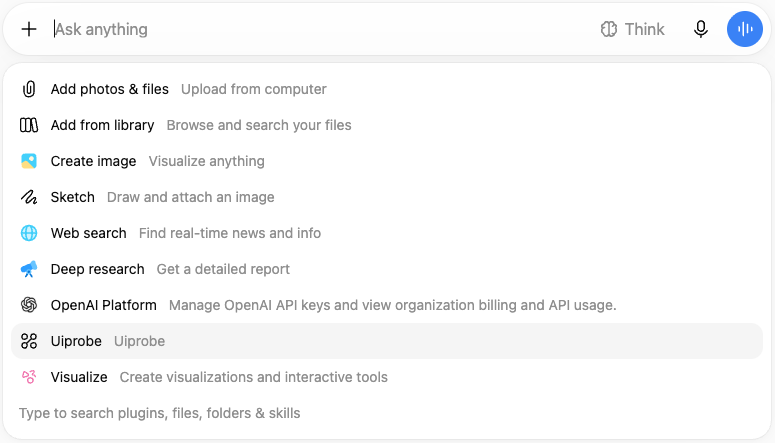
ChatGPT opens a sign-in window. Sign in with the Figma account you use for Uiprobe and approve access. When the window closes, Uiprobe shows up under Installed on the Plugins page.
Copy the Figma link from the frame itself: select the frame in Figma and press Cmd+L (Ctrl+L on Windows). A link to the whole file doesn't tell us which frame to compare.
ChatGPT can't reach a page on localhost, and it can't run commands on your computer. You can make the page reachable yourself with a free Cloudflare tunnel. You don't need a Cloudflare account.
brew install cloudflared. For Windows and Linux, see Cloudflare's download page.cloudflared tunnel --url http://localhost:3000 --http-host-header localhost. Replace 3000 with the port your page runs on.https://…trycloudflare.com address it prints and give it to ChatGPT as the webpage URL.While the tunnel runs, anyone with the address can open your page. A tunnel doesn't get past a login: a page behind a login is captured as its login page. Each new tunnel gets a new address, so when you run the probe again later, give ChatGPT the new address.
ChatGPT may ask you to confirm before it calls Uiprobe. You can change when it asks under Settings, Plugins, Uiprobe, Permissions.
A probe usually takes a few minutes. ChatGPT waits for the result, then summarizes the findings with a link to open the probe in Uiprobe. There you can review every finding on the canvas in the Probe Inspector.
Each new run counts toward your plan's runs, the same as a run from the web app. When you change the page, ask ChatGPT to run the existing probe again. The new run is added as a new version of the same probe, so you keep the history.
The sign-in window says "Your session expired". Close it and try again from Settings, Plugins, Uiprobe. If it happens again, contact support@uiprobe.io.
Sign-in works, but ChatGPT can't reach Uiprobe. The Figma account you signed in with has no Uiprobe account yet. Sign up at app.uiprobe.io with that Figma account, then connect again.
ChatGPT says the webpage is not accessible. The page has to load for a visitor on the open internet. Pages behind a login or on a private network can't be captured. For a page on localhost, use a tunnel as described above.
ChatGPT says the Figma frame is not accessible. Check that the Figma account you signed in with can open the file. If it can, sign in again so we get a fresh Figma connection.
ChatGPT says you are out of runs. Your plan's runs are used up. You can still list probes and read their findings.
Continue with:


The fastest way to see how your implementation compares to the design. No screenshots, no guessing
Compare
© 2026 · Built by UIPROBE