FOR PRODUCT DEVELOPMENT

The design is in Figma. Verify the build reflects it.

The design is in Figma. Verify the build reflects it.

Uiprobe compares your Figma frame against the live page and surfaces every visual difference: colour, spacing, typography, with exact expected vs actual values.

Free forever for personal projects · No credit card

Uiprobe detecting an incorrect font size on a live web page, showing expected and actual values
01
the problem

Design intent gets lost between Figma and the browser.

The gap between a Figma frame and a rendered page is never zero. Font weights round, spacing values shift, colour tokens drift. These differences are small enough to miss in a quick review and consistent enough to be visible once someone looks carefully.
The standard fix is manual: open Figma and the browser side by side, switch between tabs, compare by eye. It works at small scale. It doesn't hold up across a full product with multiple surfaces and a team shipping continuously.
Uiprobe turns that manual process into an automated check.
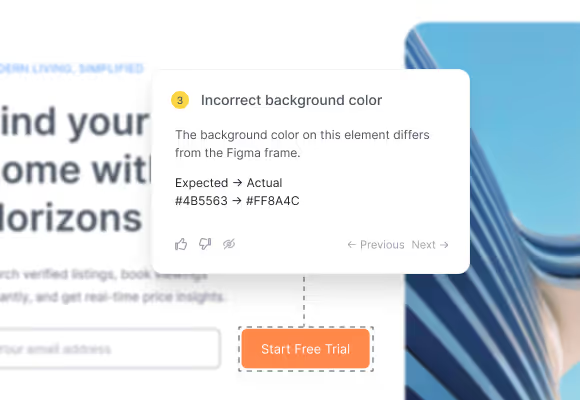
Annotation card showing an incorrect background color with expected and actual hex values
02
what gets missed

A visual check by eye catches the obvious. It misses the rest.

Manual review finds what's clearly wrong. It misses what's subtly wrong: a font weight one step off, a spacing value 4px short of spec, a colour shifted by a few hex digits. Those findings accumulate across a product and surface in stakeholder feedback after release.
03
what Uiprobe surfaces

Every finding shows what the Figma spec says and what the page has.

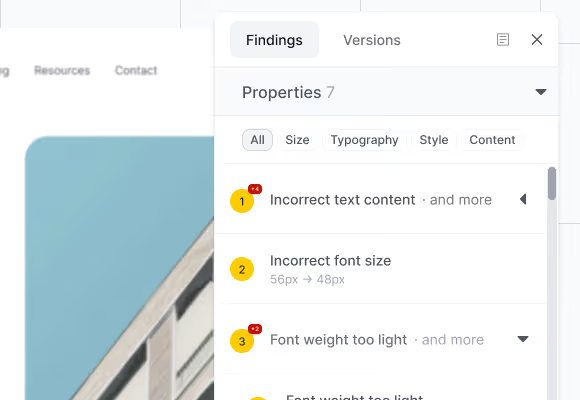
Uiprobe doesn't surface a general sense that something is off. It tells you the property that differs, the value in Figma, and the value on the page, for every finding. That's the information a developer needs to fix it and a designer needs to confirm it's fixed.
Findings panel showing property findings grouped by type with category filters
04
how it works

From Figma frame to verified build in seconds.

Three steps. No setup beyond a Figma sign-in.
Step 01

Paste the URLs.

Paste your Figma frame URL and the URL of the page you want to verify: localhost, staging, or live.
Step 02

Uiprobe runs the comparison.

Uiprobe reads the Figma spec and the rendered page and surfaces every visual difference as a finding with exact values.
Step 03

Review the findings.

Findings are organised by Properties, Spacing, and Unverified. Developers fix, designers confirm, and the team re-runs until no findings remain.

A verification step that fits
how your team builds

Sign in with Figma. Point Uiprobe at the page. See every difference in seconds.

Footer: NO CREDIT CARD · WORKS WITH ANY FIGMA SEAT

© 2026 · Built by UIPROBE