About

About Uiprobe

Uiprobe reads the difference between design and build.

Property by property.

Uiprobe is a visual QA tool that compares a Figma frame against a live webpage and reports what diverges as findings: spacing, typography, color, and sizing. The comparison reads the properties of both sides rather than judging two images against each other. It runs as a web app, a Chrome Extension, and a Figma plugin.

Free forever for personal projects · No credit card

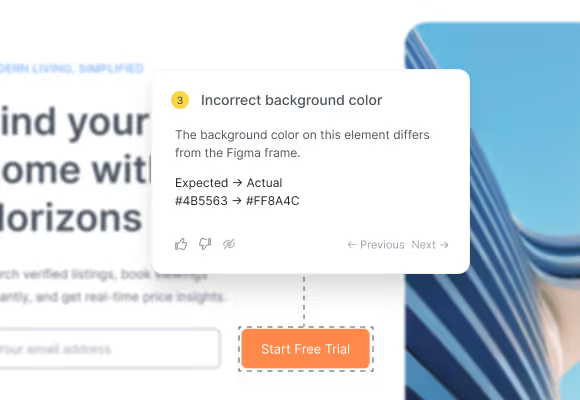
Annotation card showing an incorrect background color with expected and actual hex values
01
the product

We answer one question: does this page reflect the design?

You give us a Figma frame and the page you want to check. We read the properties of the elements on both sides, pair them up, and report every place the rendered page diverges from the design. The result is a set of findings grouped into Properties, Spacing, and Unverified.
The comparison is deterministic. The same design and the same page produce the same findings on every run, because the judgment is a property comparison rather than a model deciding what looks close enough. Screenshots are used to locate elements on the page. They are not what we compare.
A probe always needs both sides: your design and your page.
02
how it works

Three things make our comparison different.

Most tools in this space either overlay two images or ask a model what looks wrong. We do neither.
01

Properties, not pixels

We read spacing, typography, color, and sizing from the design and from the rendered page, then compare the values directly. Nothing is decided by looking at a picture.
02

The same answer every run

Deterministic comparison means findings stay stable between runs. Re-run after a fix and the delta shows you what cleared and what still diverges.
03

Visible coverage

Elements we detect but cannot map yet go to Unverified. You can see what was checked and what was not, instead of trusting a silent pass.
03
who it's for

Anyone who has to answer for what shipped.

The work is the same whether you built the page, designed it, or signed it off.
01

Developers

Check your implementation against the design without opening both windows and measuring by eye.
02

Designers

See where the build diverges from your intent, with the specific values rather than a general sense that something is off.
03

QA engineers

Add visual verification to a test pass that already covers function and performance.
04

Agencies and freelancers

Show a client what was delivered against what was agreed, with a record you can point at.
04
at a glance

The short version.

What Uiprobe is, what it needs, and where it runs.
1

What it is

A visual QA tool that compares Figma designs against live webpages and reports property-level differences as findings.
2

What it needs

A Figma frame and the page you want to check against it. A probe always requires both.
3

Where it runs

Web app, Chrome Extension, Figma plugin, and MCP server. Chrome, Arc, Brave, and Edge. A Figma Dev or Full seat is required.
4

What it costs

Free during beta. Ten probes a month, no card.
05
why we built it

We got tired of measuring.

Functional testing has automation. Performance testing has automation. Checking whether the interface looks the way it was designed is still a person switching between two windows and reading spacing values off a screen. We had done that job enough times to want it to stop.
So we built it. Uiprobe reads both sides as data and reports the differences, which means the answer is the same every time you run it. That constraint shaped everything else about the product.
We would rather ship a tool that tells you the truth about one page than one that guesses about a hundred.

Check a page you think is finished.

Sign in with Figma, point Uiprobe at a live page, and read the differences.

Footer: NO CREDIT CARD · WORKS WITH ANY FIGMA SEAT

© 2026 · Built by UIPROBE