FOR DESIGN SYSTEMS

Your Figma components and your live product drift apart over time

Your Figma components and your live product drift apart over time

Uiprobe compares Figma component specs against rendered pages and surfaces every property-level difference: colour, typography, spacing, with exact values.

Free forever for personal projects · No credit card

Uiprobe detecting an incorrect font size on a live web page, showing expected and actual values
01
the problem

Design tokens drift. Components diverge. Nobody catches it until it's visible.

Every sprint introduces small divergences. A colour token gets approximated. A type scale gets locally overridden. A spacing value shifts during a component refactor. None of it gets caught in code review.
By the time someone notices, the divergence is distributed across dozens of pages. Tracking it down manually means comparing Figma frames to live pages one at a time, which is the work the design system was supposed to eliminate.
Uiprobe makes that verification fast, repeatable, and exact.
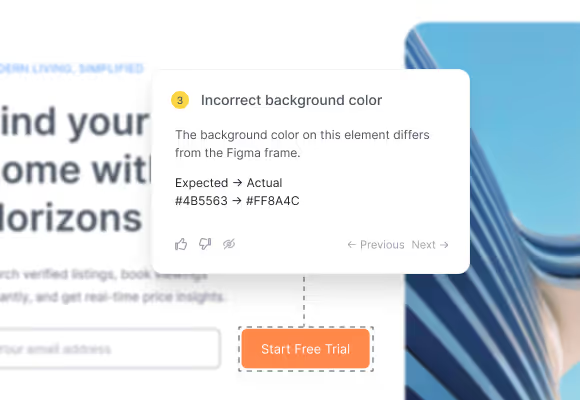
Annotation card showing an incorrect background color with expected and actual hex values
02
where it drifts

Component drift is property-level. It needs property-level detection.

Component drift is rarely obvious from an overlay. It's a font weight one step off, a border radius 2px wider than the token, a colour shifted by a shade. Uiprobe surfaces those differences with the Figma value and the rendered value side by side.
03
tracking change over time

Run a probe on any component page. Compare results across versions.

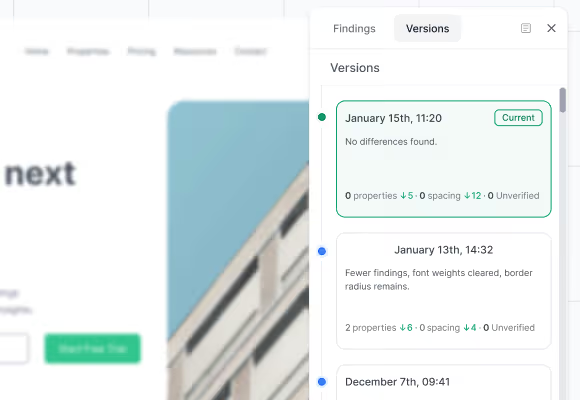
Probe runs are saved. Run a probe on a component page today, make fixes, re-run next sprint. The Versions panel shows what changed: which findings were resolved, which were introduced, which persisted. That's how you know a component reflects the spec, not just that it looked right at a glance.
Versions panel showing probe run history with section counts and deltas between versions
04
how it works

From Figma component spec to verified page in seconds.

Three steps. No setup beyond a Figma sign-in.
Step 01

Paste the URLs.

Paste your Figma frame URL and the URL of the page you want to verify: localhost, staging, or live.
Step 02

Uiprobe runs the comparison.

Uiprobe reads the Figma spec and the rendered page and surfaces every visual difference as a finding with exact values.
Step 03

Review the findings.

Findings are organised by Properties, Spacing, and Unverified. Developers fix, designers confirm, and the team re-runs until no findings remain.

Know when your components
drift from the Figma spec

Sign in with Figma. Point Uiprobe at the page. See every difference in seconds.

Footer: NO CREDIT CARD · WORKS WITH ANY FIGMA SEAT

© 2026 · Built by UIPROBE